
AI assistant
The AI assistant for hydrologists
Ask your question in plain language. The AI assistant in Dawaco Phrea™ finds the answer in your own monitoring data, does the calculation and shows what it rests on: with chart, map, ranking and cited sources. The judgement stays with you.
One question, one answer you can check
An example conversation on the demonstration network, cut down to the essentials. In practice the answer depends on your own data.
- Your question: Which wells have dropped the most since 2020?
-
AI assistant
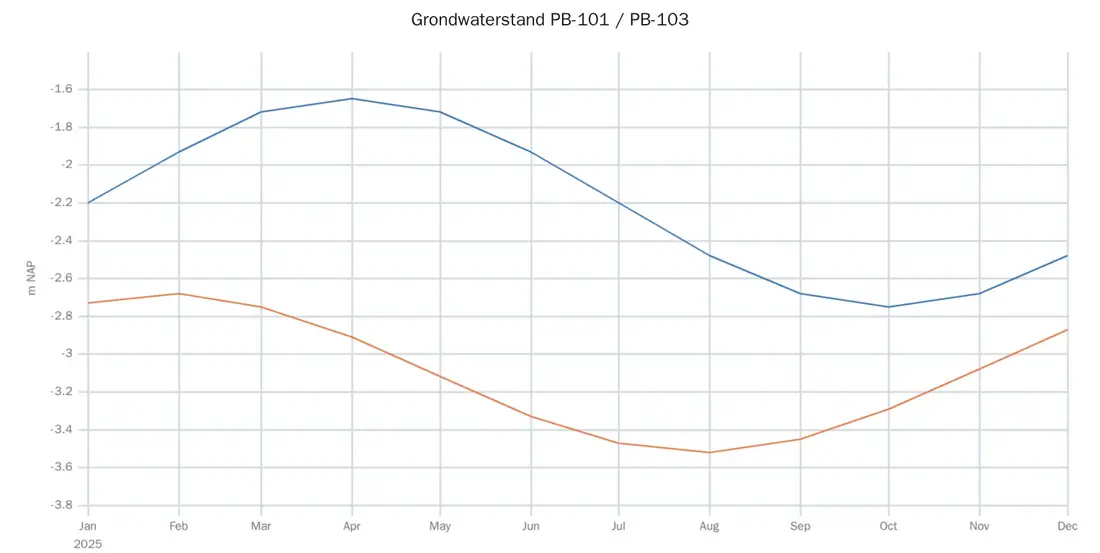
From January 2020 to June 2026, PB-101 shows the steepest decline, at 0.94 m. The three steepest declines all lie in the southern well field. The annual cycle stays intact: the whole level shifts, the pattern does not.
Groundwater level, m NAPPB-101PB-103 Point size = decline - Source · validated levels, demonstration network
- Caveat · precipitation and evaporation not accounted for
The judgement stays with the hydrologist. A decline is not yet an explanation; the assistant sets it out, you assess it.
In Phrea
A chart from the answer
This is what a chart in an answer looks like, on the demonstration network.
What an answer gives you
The assistant gives you what you need as a hydrologist to answer a question: the result, the picture and the caveat.
-
In your own words
Ask about levels, trends, monitoring points or networks in your own words. You do not need to know field names or a query language.
-
With a chart and a map
Levels and other series appear as a chart in the conversation, and the map shows where the points the answer is about are located.
-
With source and caveat
You see what an answer rests on, and the uncertainties are stated instead of left out.
-
With expert knowledge alongside
The assistant has its own hydrological knowledge library. That lets it answer professional questions about method and theory too, next to questions about your measurements.
-
With a reference to the paragraph
When an answer draws on that knowledge, it names the paragraph in the library it rests on, so you can read it yourself.
-
Concise or explained
Choose a concise answer as an expert, or an explanation that walks through the reasoning step by step.
Some functions are available as an add-on module.
Beyond the conversation
The assistant is not only there when you ask a question.
-
Flags what needs attention Module
Standing monitors keep an eye on your network and report what needs attention, even when nobody asks.
-
Searches your own documents Module
Find what your own reports and documents say, in plain language.
-
Helps with reports and exports Module
Assistants put reports and exports together for you. You review the result before you send it.
Some functions are available as an add-on module.
What the AI assistant does
Four promises you can test against your own kind of questions.
- Answers questions about your groundwaterThe question is about your monitoring points, and the answer comes from your own measurements.
- Shows what the answer rests onWith source and caveat, so you can check it before you use it.
- Presents the result the way a hydrologist assesses itIn a chart, on a map and as an overview, right in the conversation.
- Works on the same data as the rest of PhreaThe assistant reads the data you validate and model, with no exports between packages.
Limits
The judgement stays with the hydrologist
The assistant is built to make your work faster and better grounded, not to take it over. That is why it is open about what it does and what it does not do.
- Supports, does not decideThe assistant calculates, orders and shows. Interpretation and decisions stay with the hydrologist.
- Verifiable rather than persuasiveAn answer shows what it rests on. You can check it before you use it in advice or a report.
- Caveats are statedA gap in the record, a short series or a factor that was not included: the answer says so.
- The raw measurement is keptYour measurement stays your measurement: every correction carries a reason and can always be reverted.
AI under your control
Concrete arrangements about where processing takes place and who may use the assistant.
- Within the EU
- AI processing takes place within the EU. Your data stays in the EU, whether you use Phrea as SaaS or on your own server.
- Per module and per user
- Switch AI on where it adds value and leave it off where you prefer, per module and per user.
- Usage limits
- Usage limits apply per user, so use of the assistant stays predictable.
- Role-based access
- Read, write, administration and roles per module.
- Never used to train AI
- Your data is never used to train AI. Not by us and not by our AI provider. Your measurements and your questions to the assistant are used only to answer you.
Questions about AI and data processing? E-mail info@dawaco.nl.
FAQ
Frequently asked questions
Does the AI assistant replace the hydrologist?
No. The assistant answers questions from your own monitoring data, with charts, maps and cited sources. The judgement stays with the hydrologist.
Where do the answers come from?
From the data in your own Phrea environment: the same series, monitoring points and networks you manage and validate. The answer states which data it rests on.
Can I check how an answer came about?
Yes. An answer about your data shows what it rests on and where it is uncertain, so you can check it before you use it.
Where is AI processed?
Within the EU. See AI under your control above, and Security and cloud.
Can I switch the assistant off?
Yes. How you control AI per module and per user is described above under AI under your control, and on the Security and cloud page.
Is our data used to train AI?
Your data is never used to train AI. Not by us and not by our AI provider. Your measurements and your questions to the assistant are used only to answer you.
When is Dawaco Phrea™ available?
Dawaco Phrea™ is available from October 2026. Some functions are available as an add-on module.
Ask Phrea your own questions
In a demo you ask the questions you meet in your own work, on the demonstration network. Available from October 2026.